BrightBridge Assist gives managers and administrators an AI-powered assistant that helps surface answers, locate information, summarize workforce data and guide routine HR, payroll, compliance and operational tasks—using the context already connected across your BrightBridge environment.
Get help navigating workforce information without digging through multiple systems.
Use employee, payroll, compliance, training and workflow data already in BrightBridge.
Use AI to support decisions and administration—not replace employer judgment.
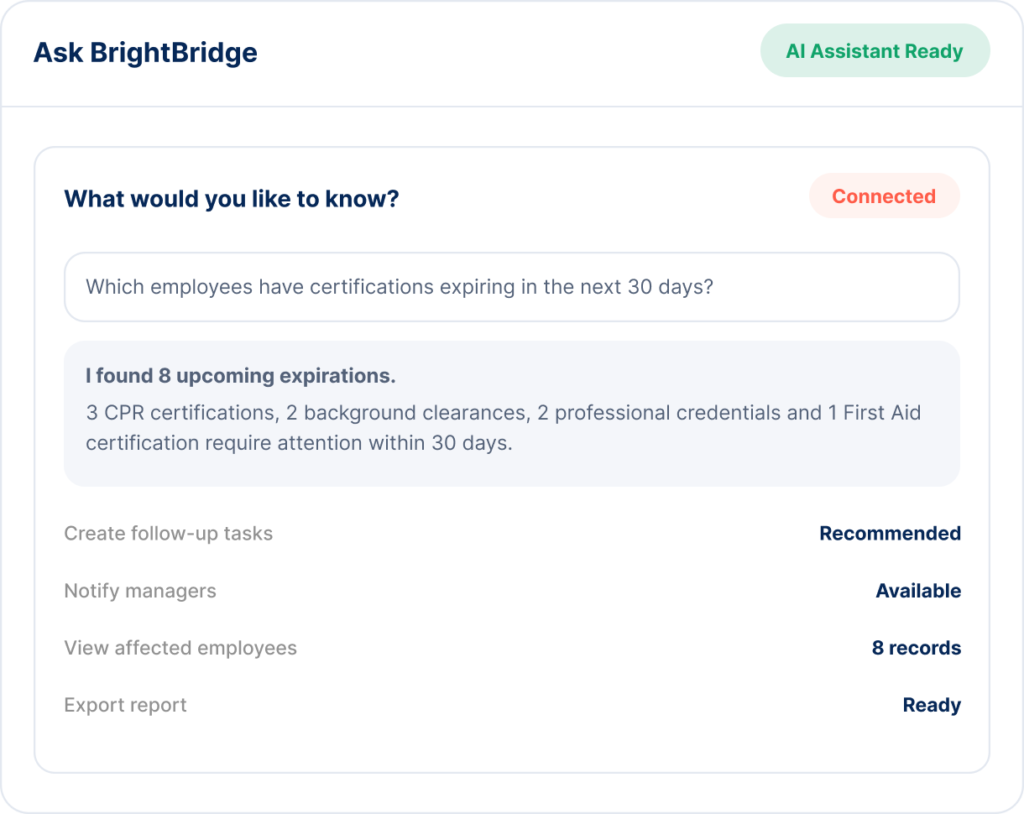
The BrightBridge AI Assistant is designed to help users navigate information and routine administrative work across the connected BrightBridge platform.
Use natural language to find information across employee and operational records.
Find, summarize and surface information from workforce documents more efficiently.
Help administrators identify missing, expiring and overdue compliance items.
Use AI to help determine the next administrative step and launch connected workflows.
Turn workforce metrics into concise management-level summaries.
Help managers navigate routine HR and workforce administration questions.
The BrightBridge AI Assistant is designed to work with connected workforce context—helping users move from a question to the relevant record, metric, document or workflow instead of searching disconnected systems one by one.
Find relevant workforce information without jumping across multiple screens and systems.
Move from an answer to an assigned task, reminder or workflow more quickly.
Use connected employee, payroll, compliance and training information together.
Give managers a repeatable way to navigate routine workforce questions and next steps.
The assistant can help surface information and guide the next administrative step.
BrightBridge uses AI as an interface into the workforce information and workflows already connected across the platform.
Enter a natural-language question about employees, payroll, compliance, training, workforce activity or operations.
The assistant uses relevant connected context to identify the records, documents or metrics related to the request.
BrightBridge can surface a concise answer, summary, exception or suggested next administrative step.
Where appropriate, users can move into a connected workflow, task, report or employee record for follow-up.
Childcare administrators often manage staff credentials, training, licensing documentation, background clearances and employee records across multiple classrooms or locations. BrightBridge AI can help surface those requirements without forcing directors to search through spreadsheets, folders and disconnected systems.
Identify staff with upcoming CPR, First Aid or other certification expirations.
See which employees still have required learning outstanding.
Surface incomplete personnel records or missing compliance documents.
Compare compliance or workforce activity across multiple centers.
Help administrators find relevant documentation and unresolved items before review.
Move from identified gaps to assigned reminders and corrective actions.
Example: “What needs attention before our next inspection?”
BrightBridge AI is designed to support organizations where managers need faster access to workforce information across changing teams, locations and compliance requirements.
Ask about staff files, credentials, training, compliance, scheduling and location-level workforce readiness.
Navigate credential, training, workforce and recurring employee administration questions more efficiently.
Surface workforce, certification, time and field-employee information across teams and projects.
Help multi-location managers navigate scheduling, attendance, payroll and employee administration questions.
Give lean administrative teams faster access to workforce information and recurring process guidance.
Support managers with employee, performance, HR and workforce information across growing teams.
BrightBridge AI is designed to assist with information access, summaries, recommendations and routine administrative workflows. It does not replace employer judgment, legal review or management responsibility.
Use the assistant to find records, metrics, documents and unresolved items faster.
Support routine administrative follow-up with suggested actions and workflow options.
Employment, compensation, performance and business decisions remain with your organization.
Legal, regulatory or complex HR matters should be reviewed by the appropriate qualified professional.
The assistant is positioned to help with routine questions across HR, payroll, compliance, workforce management, training, performance, documents and connected operational reporting.
The AI Assistant is designed to work within the access and permission structure of the BrightBridge environment. Users should only receive information they are authorized to view.
Where supported, the assistant can help users move from an identified issue or question into a connected BrightBridge workflow, task, report or record for action.
No. BrightBridge AI is intended to support administrative workflows and information access. It does not provide legal advice or replace qualified legal, regulatory or HR expertise.
No. BrightBridge AI supports routine administration and information access. Your organization remains responsible for employee supervision, business judgment and employment decisions.
See how BrightBridge AI can help your team find answers, identify priorities and move routine workforce administration forward faster.
Your HR, Payroll & Compliance Department. Without the Overhead.
© 2026 BrightBridge Assist. All rights reserved.