BrightBridge Assist brings together the features businesses need to manage HR, payroll, compliance, benefits, workforce operations, learning, performance and reporting—without forcing teams to piece together separate systems and manual processes.
Keep employee and operational data working across the platform.
Support the recurring tasks managers and administrators handle every day.
Reduce manual follow-up and surface what needs attention faster.
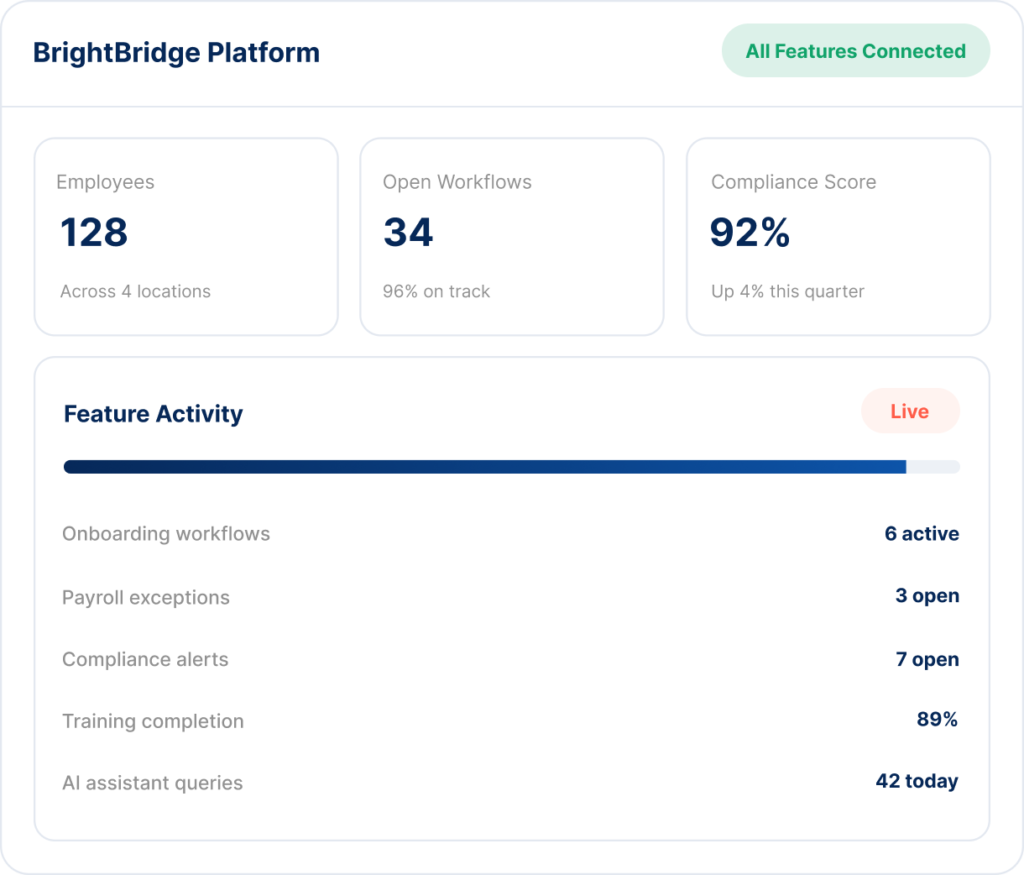
BrightBridge combines operational tools, automation and reporting across the functions that keep your workforce moving.
Maintain a centralized employee profile throughout the workforce lifecycle.
Standardize employee starts and exits with repeatable workflows.
Coordinate payroll inputs, changes, approvals and recurring processing tasks.
Monitor workforce requirements, deadlines and documentation.
Support eligibility, enrollment, deductions and recurring benefit changes.
Track worked hours, attendance activity and exceptions.
Coordinate staffing, shifts, coverage and employee availability.
Assign and track required learning and employee development.
Structure goals, reviews, feedback and employee development.
BrightBridge Workflow Hub helps convert recurring administrative processes into structured automations with triggers, assignments, reminders, approvals and escalations.
Launch tasks automatically from employee events, dates or system activity.
Route requests to the appropriate manager or administrator.
Follow up before deadlines and elevate unresolved items.
Keep workflow ownership and completion status visible.
Use one event to coordinate actions across HR, payroll, training, compliance and benefits.
BrightBridge reporting helps leaders monitor workforce health, recurring risks and operational trends across multiple functions and locations.
See high-level workforce, payroll, compliance and operational metrics in one view.
Compare activity and performance across different sites while preserving local visibility.
Surface unresolved payroll, attendance, compliance and training items that need attention.
Track changes over time instead of evaluating isolated data points.
Give executives, managers and administrators the level of visibility appropriate to their responsibilities.
Support recurring reviews across HR, payroll, workforce, compliance and training.
The BrightBridge AI Assistant helps users find information, summarize workforce data, identify open issues and navigate routine administrative workflows across the connected platform.
Ask about employees, payroll, training, compliance and workforce activity.
Find and summarize information from workforce policies and records.
Turn metrics and exceptions into concise leadership-level snapshots.
Move from an answer to an assigned task, reminder or follow-up workflow.
Examples of how managers and administrators can use the AI Assistant.
BrightBridge is especially suited to employers managing hourly teams, multiple locations, recurring compliance requirements and high-volume workforce administration.
Manage staff files, credentials, training, scheduling, payroll, compliance and inspection readiness across childcare locations.
Support credentialed and shift-based teams with connected workforce, compliance and training tools.
Coordinate payroll, time, workforce records, certifications and field-team administration.
Manage hourly workforces, scheduling, payroll, onboarding and documentation across locations.
Give lean administrative teams stronger HR, payroll, compliance and workforce infrastructure.
Support growing teams with connected employee records, benefits, performance and reporting.
BrightBridge Assist combines platform features with administrative support so businesses can reduce internal workload while retaining control over employment and operational decisions.
Your company retains authority over hiring, supervision, compensation, policies and employment decisions.
Scheduling, performance, staffing and day-to-day supervision remain with your organization.
We help manage records, workflows, recurring tasks and back-office processes.
Use technology to support consistency without removing human judgment.
No. BrightBridge can be structured around the services and platform capabilities your organization needs, while additional value comes from connecting multiple workforce functions together.
Yes. The platform is designed to provide both organization-wide and location-level visibility across workforce, payroll, compliance, training and related operations.
Workflow Hub & Automation is designed to support recurring tasks, reminders, approvals, escalations and trigger-based workflows across BrightBridge modules.
Yes. The BrightBridge AI Assistant is positioned to help users find information, summarize connected workforce data and support routine administrative workflows.
Yes. A core part of the BrightBridge positioning is a connected ASO environment where employee data and recurring workflows can work across HR, payroll, compliance and other workforce functions.
Explore how the platform can connect your HR, payroll, compliance, workforce, automation, analytics and AI capabilities in one place.
Your HR, Payroll & Compliance Department. Without the Overhead.
© 2026 BrightBridge Assist. All rights reserved.