BrightBridge Assist turns recurring HR, payroll, compliance and workforce processes into structured workflows with assignments, reminders, approvals, alerts and clear accountability—so important work keeps moving without constant manual chasing.
Reduce repetitive emails, reminders and manual task chasing.
Assign every workflow step to the right person with visible deadlines.
Automate work across HR, payroll, compliance, training and workforce management.
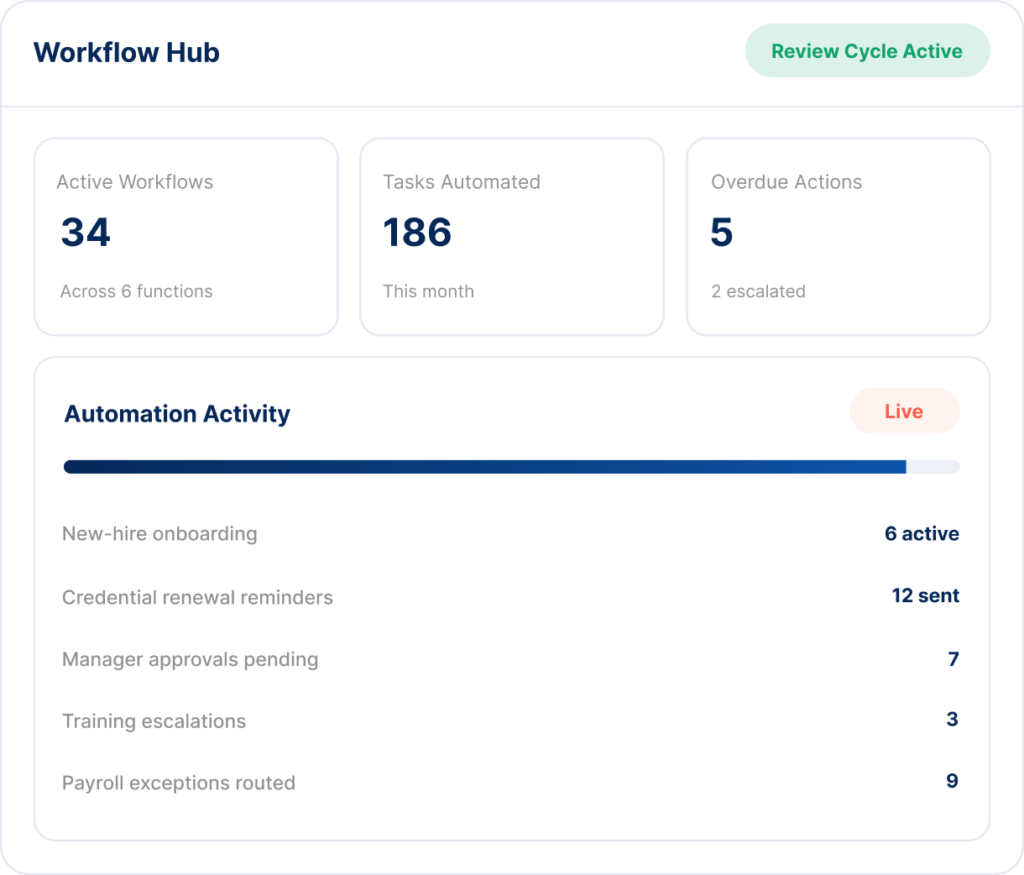
BrightBridge helps organize the work behind your people operations so tasks move automatically from one person, step or system to the next.
Automatically create and route recurring tasks based on events, dates or employee activity.
Standardize approvals for employee, payroll and workforce actions.
Automatically notify employees and managers before deadlines are missed.
Coordinate new-hire paperwork, training, acknowledgments and setup tasks.
Turn expirations, missing documents and recurring requirements into actionable workflows.
Route payroll issues and missing information to the right person before processing deadlines.
BrightBridge Assist is designed to move routine operational work forward automatically. When a trigger occurs, the platform can create a task, notify the right person, track completion and escalate when action is still outstanding.
Important work stays visible instead of disappearing into inboxes or spreadsheets.
Automated reminders reduce the time managers spend chasing employees and approvals.
See who owns each task, when it is due and whether it has been completed.
Standardize how recurring workflows are handled across teams and locations.
Build repeatable rules around the events that drive your people operations.
BrightBridge creates a structured automation layer across recurring administrative work.
A date, employee action, missing requirement or system event starts the workflow.
The appropriate task, approval or request is automatically assigned to the right person.
BrightBridge follows up based on due dates and escalates unresolved items when needed.
The completed action and supporting history remain visible within the broader employee or operational record.
Work does not happen in isolated departments. BrightBridge connects recurring actions across HR administration, payroll, compliance, benefits, workforce management, learning and performance.
Automate onboarding, offboarding, policy acknowledgments and document collection.
Route missing time records, approvals, deduction changes and payroll exceptions.
Automate expiration alerts, corrective actions and recurring compliance tasks.
Assign required courses and escalate overdue training automatically.
Coordinate approvals, shift changes, time-off requests and attendance follow-up.
Trigger reviews, check-ins and development follow-up on recurring schedules.
Instead of manually coordinating every department, BrightBridge can route the next step to each responsible person.
BrightBridge is especially useful for organizations where managers handle high volumes of employee changes, deadlines, documentation and recurring administrative work.
Automate staff onboarding, credential reminders, training follow-up, file completion and multi-location compliance tasks.
Route recurring credential, training, workforce and employee administration requirements across teams.
Automate field employee documentation, certifications, time approvals and recurring workforce follow-up.
Coordinate onboarding, scheduling, employee documents and manager approvals across multiple locations.
Reduce administrative burden with recurring employee and manager workflows that run automatically.
Standardize approvals, onboarding, employee changes and recurring HR processes across growing teams.
BrightBridge can automate routine administrative steps while your managers and leadership remain responsible for decisions that require business judgment, employee supervision or approval.
Use workflows for reminders, document requests, assignments and status follow-up.
Managers remain responsible for decisions that require review or authorization.
Route unusual or overdue items to the appropriate person instead of silently processing them.
Keep workflow activity, ownership and completion status easier to review.
Workflow Hub is positioned to automate recurring administrative processes across HR, payroll, compliance, benefits, workforce management, learning and performance, including assignments, reminders, approvals, escalations and follow-up tasks.
Yes. Workflows can be structured around triggers such as employee events, dates, deadlines, missing requirements or recurring schedules.
Yes. Automation can include reminder and escalation logic so unresolved items become visible to the appropriate manager or administrator.
Yes. BrightBridge is designed to support repeatable workflows across multiple teams and locations while preserving ownership and visibility at the appropriate level.
No. BrightBridge automates administrative workflows and follow-up. Your organization remains responsible for business judgments, employment decisions, approvals and employee supervision.
See how BrightBridge Assist can reduce manual follow-up, standardize recurring processes and keep critical tasks moving.
Your HR, Payroll & Compliance Department. Without the Overhead.
© 2026 BrightBridge Assist. All rights reserved.